Best Habit Tracker Apps for ADHD in 2026

Most habit trackers were built for neurotypical brains. They assume you'll open the app on your own, and that a streak counter is motivation enough. Neither one holds up well with ADHD. The apps that actually help cut the friction right down and lean on a visual or environmental cue, so your memory isn't the load-bearing wall. And when you miss a day, they do something gentler than snap a streak in half. That's the lens I ran all nine through.
Quick comparison
| App | Best for | Price | Platform |
|---|---|---|---|
 HabitIt HabitIt |
AI builds your plan and recalibrates when you slip with automatic pattern detection | Freemium | iOS & Android |
 Tiimo Tiimo |
Visual daily schedule with time-blindness support | Subscription (~$8/mo) | iOS & Android |
 Routinely Routinely |
Step-by-step routine guide with time estimates | Freemium | iOS & Android |
 Habitica Habitica |
RPG rewards that make habits feel like a game | Free | iOS & Android |
 Focusmate Focusmate |
Live video body-doubling for accountability | Freemium | Web |
 Done Done |
Simple check-in tracker with minimal overwhelm | Freemium | iOS & Android |
 Streaks Streaks |
Streak chains to build momentum on key habits | Paid ($5.99) | iOS |
 Finch Finch |
Self-care habit tracking with a virtual pet | Freemium | iOS & Android |
 Forest Forest |
Focus timer that penalizes phone distraction | $3.99 iOS (free Android) | iOS & Android |
How we compared these
We went through each app's current App Store or Google Play listing in July 2026 - the price, which platforms it's on, how stingy the free tier is. Then we weighed the things that decide whether a habit app survives contact with ADHD. The big one is friction: how many taps and decisions sit between you and a logged habit. After that, whether it leans on a cue you'll physically bump into or just expects you to remember. The last test is what it does on the day you miss. Prices and free tiers move around, so check the listing before you pay.
The 9 apps
1. HabitIt
HabitIt runs on a plan, not a streak, which turns out to matter a lot for ADHD. Miss a day and nothing zeroes out; the plan just adjusts and carries on. The main screen stays deliberately plain. There's nothing to decide when you open it, and that missing decision is exactly the micro-friction that usually sends an ADHD brain bouncing off the app before it logs anything. No penalty for slipping, and no wall of badges at the door. Just today's habits and a checkmark. There's a free tier. habitit.app.
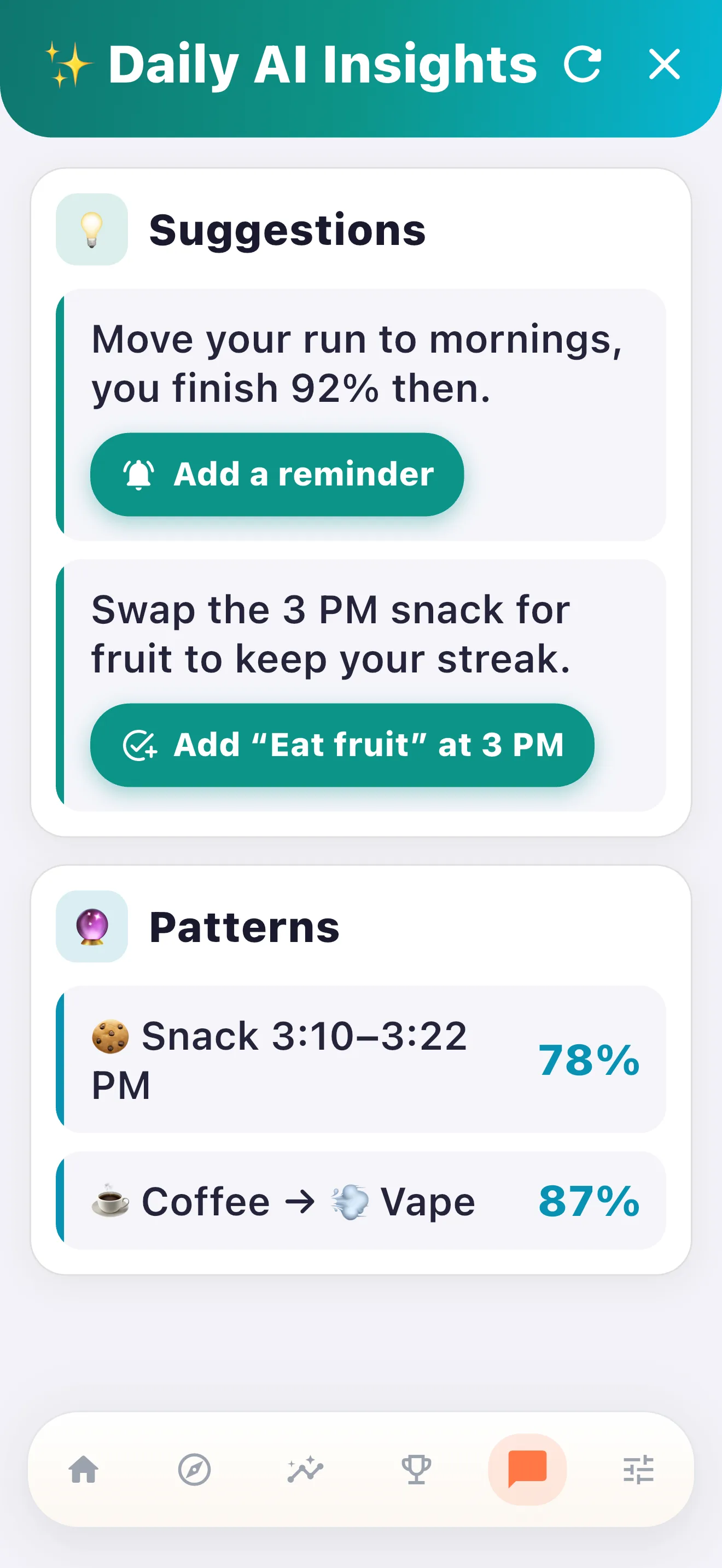
Underneath there's an AI layer a plain counter doesn't have. It watches your logs and notices when the misses clump together - a run of skipped Mondays, say, or every afternoon you crash after lunch. An ADHD brain often can't see its own patterns from the inside, so having the app name one out loud is genuinely useful. Setup runs under two minutes, which counts for a lot here, because a long onboarding is right where these apps tend to lose you on day one.
2. Tiimo
A visual schedule app built specifically for ADHD and autism. Tiimo skips the habit-list format and lays your day out as a color-coded timeline running left to right, every block sized to how long it takes and tagged with its own icon. When your brain is fighting just to orient to the morning, that visual read goes down far faster than a column of text. Its standout feature is a persistent lock-screen notification telling you what you should be doing right now, so you're never opening the app just to check what's next. For the specific ways ADHD scrambles a daily routine, it's one of the more thoughtfully built apps here.
3. Routinely
Step-by-step routine guidance with a countdown running on each step. You build out a morning routine and put a time budget on each step. The app then walks you through it, giving you a nudge - a sound or a small visual - when a step's time runs out. What you're really buying is external pacing. ADHD has a way of leaking half an hour between "brush teeth" and "out the door," because nothing scaffolds the handoff from one step to the next. Routinely scaffolds it. Best for morning and evening routines; less use for one-off habits scattered across the day.
4. Habitica
RPG gamification. Your avatar takes damage when you skip a habit and levels up when you follow through. You can also team up with other players in parties. It's polarizing in the ADHD community. Some people find the game loop is exactly the hook they needed - a hit to your avatar lands harder than any internal nudge ever did. Others just hit a wall of features and visual clutter that tips them straight into avoidance. Give it a week; you'll know inside a couple of days which camp you land in. Big community and a long track record, and it's on both iOS and Android.
5. Focusmate
Focusmate does something different from the rest: body-doubling. You book a 50-minute session with a stranger. Cameras on, you each say out loud what you're about to do, then you both work in silence side by side for the whole block. Having someone quietly present tends to do more for ADHD focus than any internal pep talk. Body-doubling is a technique ADHD organizations like CHADD actively write about, not just a trick that floats around Reddit.[1] It shines for anything needing a long stretch of attention - writing, studying, planning out a workout. Treat it as the accountability layer that makes your other habits possible, and let a different app handle the actual logging.
6. Done - A Simple Habit Tracker
Three habits on the free tier, and an interface so clean there's basically no learning curve. Here the limit is the whole point. ADHD habit tracking tends to collapse under too many habits at once, because each extra one adds to the cognitive tax of opening the app and working out what to do. Three is usually a good number to start with, and Done just keeps it there. No gamification and no social feed, nothing on screen to pull you sideways. Just a daily check for three things and that's it. It's for the people who want the shortest possible gap between "I want to build habits" and "I'm actually tracking them."
7. Streaks
An iOS app with an Apple Watch complication and room for up to 12 habits. That Watch complication is the ADHD-relevant part: you log a habit with one tap from your wrist, phone still in your pocket. Which matters more than it sounds. Plenty of ADHD users have a real phone-avoidance thing going - you unlock the phone to log one habit and forty minutes later you're deep in some feed you never meant to open. A wrist tap skips the whole trap. The app is clearly built to keep daily tracking inside about 30 seconds.
8. Finch
A self-care app with daily check-ins and a virtual pet bird that grows as you complete habits and goals. The emotional check-in is the unusual bit for a habit app - before you log anything, you note how you're actually feeling. For a lot of ADHD users, whether the habits get done tracks closely with mood, so that daily emotional context makes the history much more useful when you're looking back trying to work out why a week fell apart. The pet is gentle about it. Miss a day and your bird is fine; string good days together and it grows. Solid free tier.
9. Forest
A focus timer with a visual reward. You plant a seed and leave the phone alone, and a tree grows on the screen while you work. Switch out of the app and it withers. Something growing on screen is a clean signal that a work session is underway, and for some ADHD users that positive image lands better than a ticking countdown, which can read as pressure. It works best bolted onto a habit that needs a real stretch of focus, like reading or studying. The free tier is fine for most people. It won't track your habits for you, but it builds a decent little environment for actually doing one.
- Best plan-based, no streak shame: HabitIt
- Best visual daily schedule: Tiimo
- Best for morning-routine pacing: Routinely
- Best gamified system: Habitica
- Best accountability / body-doubling: Focusmate
- Best ultra-minimal tracker: Done
- Best Apple Watch logging: Streaks
- Best with mood check-ins: Finch
- Best focus timer: Forest
What ADHD habit tracking actually requires
Standard habit apps tend to break for ADHD users in the same three places. Worth naming them, so you can screen for the apps that actually fix them.
High friction at every step. A typical habit app makes you remember to open it, hunt for the right habit in a list, tap to log, then back yourself out again. Four steps. For a neurotypical brain that's nothing. ADHD turns every one of those steps into a place to fall off - and if any single step drags a bit (you glance at a notification and you're gone), the log never happens at all. The apps that hold up cut logging down to a step or two, and they put those steps somewhere outside the app itself: a lock screen, a watch face, a home-screen widget.
Shame-based failure handling. A streak counter is about the worst thing you can hand an ADHD brain after a slip. You miss a single day and the count drops straight to zero. Then that little monument to the miss just sits there, glaring at you every time you reopen the app. A lot of people deal with it by just not opening the app again, and that's how one missed day quietly becomes a full quit. The apps here that do this well either continue quietly (HabitIt, Finch) or skip the streak mechanic altogether (Done, Focusmate).
Memory dependency. Any system that leans on you remembering to check in is going to fail an ADHD brain eventually. Notifications help for a while, then go invisible - give it two weeks and you've tuned them out without noticing. What works instead is a cue that lives out in the world where you'll physically run into it: Tiimo's always-on lock-screen timeline, the Streaks complication sitting on your watch face, Routinely's timer going off out loud. The cue has to exist somewhere the app can't quietly bury it.
On how many habits: I'd start with two or three. Plenty of advice says start with exactly one, which is great if you can tolerate that little to track. Two or three gives you enough structure to feel like something's happening without burying you in a long daily list. Eight is too many. The thing that gets you isn't forgetting a habit here or there. It's the cognitive weight of scanning a full list every time, which makes the app feel like homework, which is how it ends up unopened.
Body-doubling is worth calling out on its own. Focusmate up there isn't a standard tracker, but it belongs here because outside social accountability is one of the strongest ADHD levers going, and most app roundups walk right past it. If your main habit needs real sustained attention - writing, say, or studying - a Focusmate session will probably carry it further than any logging app will. Run both: the tracker keeps the record, Focusmate gets the work done.
If you came here hunting for the best habit tracker apps for ADHD, or the top apps for ADHD habits 2026, or just an ADHD daily habit tracker that won't punish you for a missed day, the nine above stretch from stripped-down single-purpose tools all the way to full visual schedule systems. Whichever you pick, start small. Two or three habits, and see how that holds before you pile anything else on.
Common failures with habit apps and ADHD
Downloading a 15-feature app and abandoning it in four days. Feature-heavy apps feel great at setup and feel like a chore a week later. ADHD does badly with high setup cost; the app has to earn its place on day one, before you've configured anything. If setup runs past ten minutes, go simpler.
Using a streak-based app that punishes missed days. Said this above, but it earns a repeat: streaks are anti-ADHD by design. A streak reads like motivation and behaves like a penalty. The day you miss one - and you will - the visual hit makes climbing back on harder. Apps built around streaks really suit people who already hold the habit and just want a record of it.
Tracking eight habits at once. A long habit list is its own problem, separate from any of the habits on it. If you've got to scan and judge eight items every time you open the app, it starts feeling like a to-do list you're already losing. Better to pick the two or three that matter most right now and live with just those for a few weeks. You add more once they're actually sticking, not before. The limit is doing the work.
Relying on app notifications as your only cue. Notifications fade fast, and the more predictable they are the quicker it happens - a habit reminder at the same time with the same wording every day is about as predictable as it gets. A couple of weeks in, they stop registering as anything at all. Cues out in the environment hold up longer because the context around them keeps shifting. A banner parked on your lock screen works, so does a tap on your watch - and honestly, a sticky note on the coffee machine punches above its weight.
Expecting motivation to do a job that belongs to system design. Motivation is shaky for everyone, ADHD or not. On the high days you'd have done the habit without any app at all. It's the low days the system has to cover, and a setup that only works when you feel like it isn't really a system at all. It's just a nagging reminder of a habit you keep skipping. So build the environmental cue first. Logging comes second. Motivation you count on last, if at all.
Citations
- "Could a Body Double Help You Increase Your Productivity?" CHADD (Children and Adults with Attention-Deficit/Hyperactivity Disorder). Read the source ↗
Build your ADHD habit plan today
Free 3-day trial of all features. After that the free tier covers the basic habit plan. No subscription required.


Get the Free ADHD Habit Plan
Drop your email and we'll send a printable plan you can fill in and track. Occasional updates (max 1 per 2 weeks).
Success! Now check your email to confirm your subscription.
We respect your privacy. Unsubscribe at any time.